

Dracula Theme for IPED
Introduction
While exploring the IPED project, an open-source digital forensic tool, I saw an opportunity to contribute something that could improve the application’s visual experience: a Dracula theme.
As a fan of the Dracula color scheme, I decided to implement it as a new UI theme, allowing users to choose it alongside the existing Light and Dark themes.
What started as a visual customization became my first contribution to the official IPED repository.
In this post, I’ll share how I implemented the theme, the technologies involved, the testing process, and my experience collaborating with the project’s maintainer.
What is IPED?
The IPED (Indexador e Processador de Evidências Digitais, or Digital Evidence Processor and Indexer) is an open-source digital forensics tool developed by experts from the Brazilian Federal Police since 2012.
Originally created to address the challenges of processing and analyzing large volumes of digital evidence in criminal investigations, IPED became an important part of Brazil’s digital forensics landscape.
The tool enables forensic examiners to process, index, search, and analyze large collections of digital evidence, including files recovered from computers, storage devices, and other digital media.
Although developed in Brazil, IPED is not limited to Brazilian investigations. Its open-source availability has helped expand its adoption beyond the country, making it a tool of international relevance in the digital forensics community.
Today, IPED continues to be maintained and improved through contributions from its developers and the open-source community.
The Dracula Theme
The goal was to introduce the official Dracula color palette into IPED while preserving the existing themes.
The implementation uses Java Swing and Nimbus, following the application’s existing theme architecture.
The theme also customizes several interface elements, including tables, viewers, graphs, trees, filters, and docking panels.
Implementation
The implementation involved modifying the application’s existing theme structure.
The main changes included:
»
DraculaTheme.javaCreated a new theme class extending the existing
Themeclass, defining the Dracula palette and applying colors to the supported UI components.
»
ThemeManager.javaRegistered the new theme in the theme manager, making it available alongside the existing Light and Dark themes.
Localization
Added the Dracula theme name to all six desktop localization files:
» English, Brazilian Portuguese, German, Spanish, French, Italian
This allowed the theme to appear correctly in the application’s interface regardless of the selected language.
You can access the full Pull Request here:
Final Result
The Dracula theme was successfully merged into the official IPED repository!
The contribution introduced a new visual option while preserving the application’s existing themes and functionality.
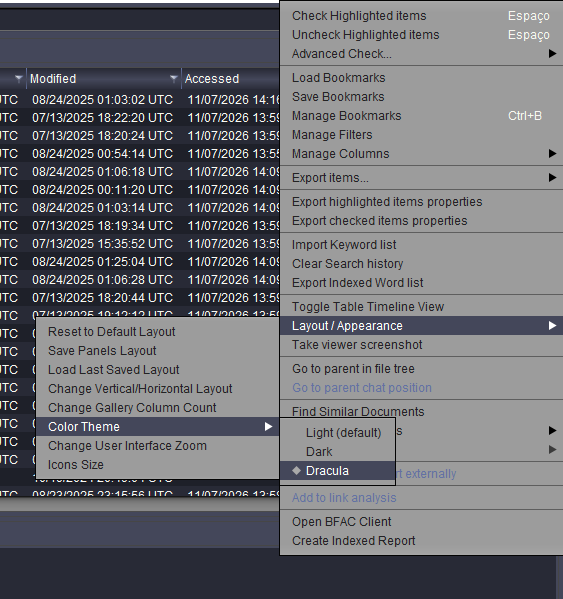
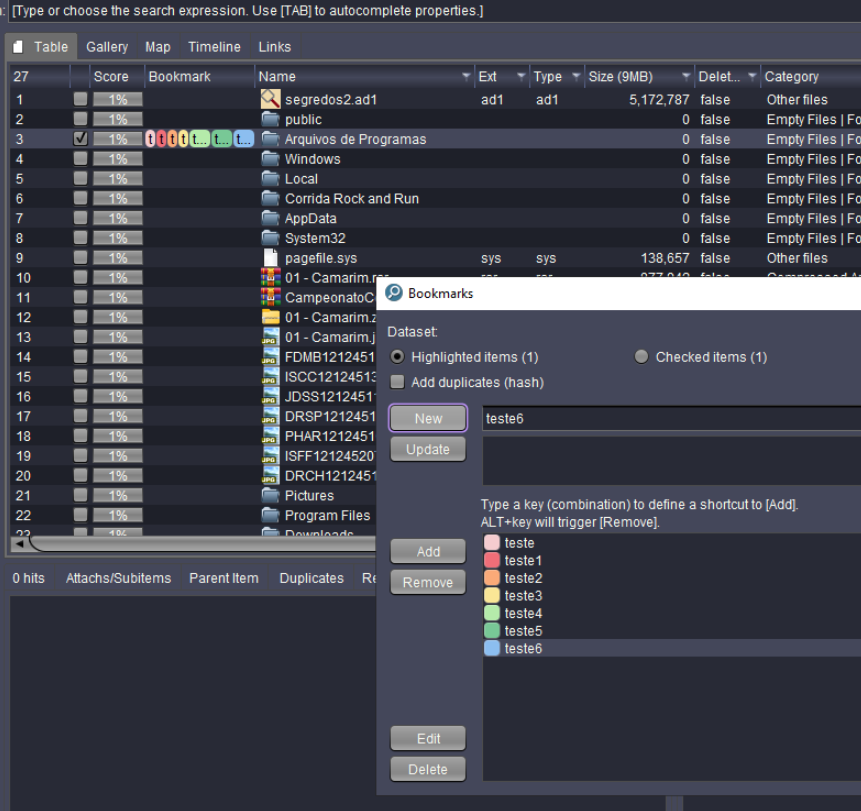
Here are some screenshots of the final implementation:
- Select the
Dracula Theme:
Dracula ThemeUI:
Credits
Special thanks to @wladimirleite for reviewing the contribution, providing feedback, and making additional improvements to the application.
I’m glad I could contribute to a project that plays an important role in the digital forensics community.
Contributed with 💜 by Karina Gante.
← Back to blog